What is the Portfolio?
Maximise your investment potential on etoro with advanced portfolio features. Filter, customise and track assets with ease for strategic trading.
Your portfolio shows all the assets, CopyTraders and Smart Portfolios you are currently investing in.
Web version of etoro
etoro mobile app version
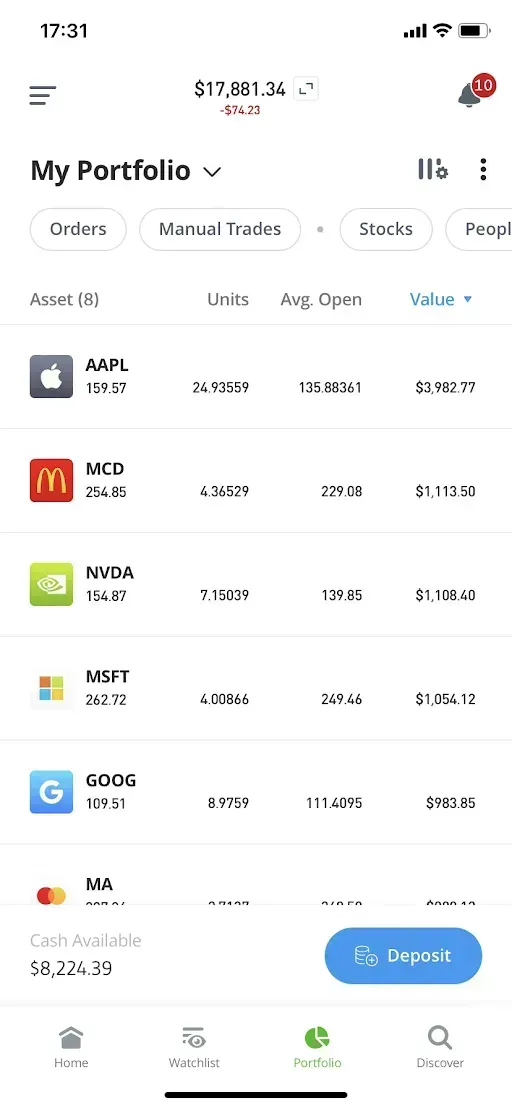
When you tap or click on any item on the list, you will see the breakdown into individual trades. This provides more detailed information and available actions for that particular holding.
Investment History
From the ‘My Portfolio’ menu at the top of the screen, you can access your History. This shows all the assets, CopyTraders and Smart Portfolios you were previously investing in.
For more information, see here: web version | mobile app
Filters
You can choose what to view by using the filters under ‘My Portfolio’:
- Orders
- Manual Trades
- Asset type (stocks, ETFs, crypto)
- People
- Smart Portfolios
Card View
The etoro mobile app shows fewer columns than the web version by default, due to the smaller screen size.
Tap the three dots

at the top right of the screen to select Card View and see full information for each item.
Customize Columns
Press the column titles to sort the items in the portfolio: low to high, or high to low.
Select

at the top right of the screen to customize the columns further.
You can:
- drag and drop to rearrange the column order
- click on the arrows to select a replacement from a list of potential alternatives:
- Units
- Average opening rate
- Invested amount
- Profit / loss (in $ or %)
- Value
- BUY button
- Copy Stop Loss (in $ or %)
- Net invested amount
- Fees
- Risk
- Current rate
Click ‘Apply’ to save your changes.
On the etoro mobile app, you also have a choice of preset column options.
| Note: Crypto trading is not available in NV, HI, Puerto Rico and the US Virgin Islands. |